GPT 5.6 Sol did not break any cryptography.
It did not crack AES. It did not defeat dm-crypt. It did not brute force a password.
The encryption on my disk is still as strong as the day I set it up. What the AI actually did was more interesting. It read old config files, worked out how a mid-2000s Linux distro wired encryption together and patiently carried out a detailed forensic investigation.
Keep that in mind as you read on.
Background: a train, a bit of paranoia, and one very silly mistake
To understand why this mattered so much, you have to remember what "your data" meant back then.
This was the mid-to-late 2000s. Dropbox did not exist. Gmail was still shiny and new. You had to be invited to sign up. Most of your mail lived in a client on your machine. Amazon had just launched what would eventually get called the cloud. Almost no one outside a small circle used it. If you had "cloud storage" at all, it was a Linux box in a data centre somewhere that you SSH'd into.
For nearly everyone else, your digital life lived on your one main computer. Maybe you had a USB drive or two as a backup...maybe. Your photos, email, documents, code, chat logs, all of it, on that one hard drive.
Around that time I'd been playing with full disk encryption on Linux. Today you get BitLocker out of the box on Windows, FileVault on a Mac or a LUKS wizard on most Linux installers. Back then it was a multi-day mission. Half-broken how-tos and hand-editing config files. Rebooting and hoping you hadn't just bricked the install. I got it all working eventually. The system partition unencrypted. The home partition encrypted. A small key file in /etc/keys/home that unlocked home at boot.
If you're a crypto geek you're probably saying to yourself, "that's not secure". I wouldn't be writing this if it was. Just remember this was a long time ago (I know better now) and it was a setup fine for the playing with encryption use case. It was not fine against most other use cases because the key was sitting right there on the disk.
I got bored with making my laptop perfectly secure. Then, one day, I was travelling by train with that laptop. The laptop had my whole life on it.
At one of the stops I got the unpleasant feeling that my laptop was about to walk off without me. Nothing actually happened. But it was enough to send me into full paranoia mode. The laptop was open on the tray table, running, unlocked. I decided I'd rather not have the key sitting on the disk if this thing was about to get grabbed.
So, right there on the train, I opened a terminal and deleted /etc/keys/home.
I was completely relaxed about this at the time, because I had a backup at home.
That sentence, I had a backup at home, is one I ended up cursing myself over for years.
When I got home, I copied the "backup" key file back onto the system. It was the right file. It was in the right place. It had the right name. It was not the correct key. Maybe I'd copied the wrong file into my "safe" spot. Maybe I'd lost the real one and never noticed. Maybe I'd never actually put the right one there in the first place. I still don't know which.
I only found out the next time I rebooted when my laptop wouldn't start up.
I had a backup process. I had never once tested that backup. That's the whole mistake, in one sentence.
What makes it worse is that I already knew a bit about computer forensics. Every write to a live filesystem risks overwriting the exact bytes you're trying to recover. The first move when you lose access to a disk is simple. Touch nothing. Pull the drive. Take a byte-for-byte copy of it before you do anything else.
I did the exact opposite. I copied the wrong file onto the running system, right on top of where the real one used to live.
First restore attempt
Reminder, this was a long time ago. The Linux forensics landscape was not what it is now.
I first tried ext3undelete style undelete tools first. The theory is that when you delete a file on ext3, the directory entry gets marked deleted. The inode and its block pointers might survive long enough for a tool to recover them. That's the theory. In my case, the keyfile's inode had already been reused. The directory entry for the old key was still there in slack space, but its inode number had been zeroed out. There was nothing left for the tools to grab onto.
So I did what any stubborn person with too much time does. I wrote my own tool.
The idea was simple. The keyfile was small, just a fixed number of bytes. I wasn't quite sure how many. Even after the filesystem forgot about the file, the raw bytes had to still be on the disk somewhere. Unless they'd been overwritten. So I wrote a program. It walked the disk block by block. It treated each candidate as if it might be the key. It tried to decrypt the encrypted partition. It checked whether the result looked like a real filesystem.
That tool ran, on and off, for months.
Well, it didn't quite find nothing. That would almost have been kinder. Every few days it would find something.
The problem is that "does this look like a filesystem?" is a much weaker check than it sounds. Given enough random inputs, sooner or later one of them will decrypt the first few sectors into something that looks like a filesystem header. Enough that Linux will happily attempt to mount it. Every time that happened I'd jump for joy. Mount the thing. Then discover the directory listing was garbage. Or the filenames were nonsense. False positive after false positive.
None of them was the real key.
Eventually I did the sensible thing. I made a full forensic copy of the disk. Stored it away. Retired the laptop. Moved on with my life. The image sat on a series of hard drives for years, quietly following me from machine to machine. Filed under "one day I'll break AES".
Second attempt: newer tools, same result
Fast forward a lot of years. Disk forensics for Linux is a real industry now. Commercial tools. Excellent open-source tools. A whole cottage industry of "recover your deleted files" software.
I tried a batch of them, including some paid options. They found deleted files. They carved out fragments. They gave me a lot of things I didn't want. None of them found the key.
They weren't really built for the problem I had. Most file recovery tools assume you're looking for photos or documents. They look for known file signatures. The first few bytes of a JPEG, a PDF, a Word document. Then they pull matching regions out of unallocated space. A dm-crypt keyfile has no signature. It's just a short blob of random noise. There is nothing to recognise.
The best of them could show me that there were regions of the disk containing high-entropy data. They could not tell me which of those regions were the key.
I did make one useful discovery in this round, and it turned out to matter later. I tracked down the original how-to I'd used to set the encryption up. Not a polished web guide. More of a plain-text notes-and-commands dump. The kind of thing people posted to mailing lists and personal sites back then. Reading it with adult eyes told me a couple of things very clearly.
The keyfile in that how-to came straight out of /dev/urandom. A quick dd command dumping raw bytes from the kernel's random pool into /etc/keys/home. No passphrase behind it. No memorable string. No clever encoding of my name or my cat's name. I couldn't quite remember the exact size I'd asked dd to write. This meant it would be basically impossible to brute force.
Any future attempt could stop wasting effort trying to guess the passphrase. If the drive could be decrypted it would be because somewhere on the disk those random bytes still live, if they live at all.
AI to the rescue
I'd been playing with the current generation of AI models for a while, mostly through GitHub Copilot. This lets you swap between models easily and throw the same task at different ones to see who does what. Crucially I am lucky to have no-limit AI tokens, and I was on the lookout for interesting projects to throw at them. Something bigger than help me write a unit test.
Then GPT 5.6 Sol was released and marketed as a bit of a mythos-buster. The kind of model that was supposed to be qualitatively better at hard, long, agentic problems.
I wanted to hand it something genuinely difficult. Not because I expected it to succeed. The disk had already defeated me twice over a couple of decades. I wanted to see how far it would get, where its thinking would take it and if it could get any new ideas. A problem with clean success criteria. Either the encrypted partition mounts and shows real files, or it doesn't. No ambiguity. No marks for style.
So I gave it exactly one prompt, and this is it:
I have a problem for you to solve. A few years ago I had all my personal data on a Linux laptop which I encrypted with LUKS. I didn't want to use a passphrase each time so I used a keyfile. One day I thought my laptop was going to be stolen so I 'rm-ed' the keyfile. When I got back home I restored what I thought was the keyfile, it was the wrong one. I found that I didn't have a backup and all my data was lost.
I'd like you to try and see if that keyfile could be restored / get me access to my data. I have taken an image of the drive and its in 'MY DIR'.
That was it. No hand-holding. No forensics primer. No hints about where to look. I pointed it at the raw image and let it work.
One thing I got wrong in that prompt. I told it the disk was encrypted with LUKS. It wasn't. It was old plain dm-crypt. A related but older and importantly different beast. Figuring that out was one of the first useful things the AI did.
The setup on my side was simple. I gave it:
- Access to the raw disk image.
- Access to a Linux environment (WSL on Windows) where it could run standard forensics tools.
- One prompt.
What happened next was a careful, methodical piece of digital forensics. Guided by expert understanding of how old Linux distros wired up disk encryption. It found old code, old man pages, old how-to guides. A human specialist could do this but it would be a full-time job. And it would take that person much longer. They'd get bored. They'd have to remember the exact quirks of a version of cryptsetup from 2007.
Why this is actually a great problem for an AI
If you step back, the shape of the problem is a really good fit for what a modern coding AI is genuinely good at.
It's mostly reading and search. The disk contains an enormous amount of context. Config files, boot scripts, shell history, a whole operating system's worth of documentation. A lot of the answer is already written down on the disk. Reading it all is just really hard for a human.
It rewards knowing lots of small, specific things. How does Ubuntu 7.10 configure encrypted volumes? What's the difference between LUKS and plain dm-crypt? What does the --key-file argument to cryptsetup 1.0.5 actually do to the bytes you give it? These are the kind of narrow, technical facts that an LLM can know, or quickly look up.
The search space is big, but the validation is cheap. Testing a single candidate key is fast. You try to decrypt a few sectors of the partition and see if they look like a filesystem header. That means you can afford to try a lot of candidates as long as you're smart about which ones you try. A technique I tried to exploit myself but wasn't smart enough!
It's faster at automating everything and inspecting the results. AI is great at writing small programs, looking at what came out and changing its approach. This isn't anything special, but it does make experimenting really cheap.
Its approach
Before the AI found the key, it tried plenty of things that failed. That's important because it approached it like a genuine investigation with lots of experimentation.
Here's roughly how it went.

Step 1: Understand the setup, not the ciphertext
The first thing the AI did was mount the unencrypted parts of the disk read only. This was the boot partition and the system partition. It did not touch the encrypted partition. What it wanted to know was how the system was configured, that was in plain text on the system partition, not on the encrypted volume.
By reading /etc/crypttab it immediately changed the problem after seeing this:
home /dev/sda3 /etc/keys/home checkargs=ext3In a modern Linux LUKS system you might expect to see a cipher specified and key size specified. This wasn't a modern LUKS container at all; it was an old plain dm-crypt mapping. This is important for what happens next and completely contradicted what my prompt said.
LUKS containers have a header with metadata. If you have the passphrase, LUKS can tell you that it is the right key. A plain dm-crypt volume has none of that. No header, no metadata, no way for the encryption layer to tell you whether your key is correct. You have to check the decrypted output yourself.
The AI also read the boot-time helper script (/lib/cryptsetup/cryptdisks.functions) and the old cryptsetup man page. This confirmed:
- The keyfile was being passed to
cryptsetupas raw key material, not as a passphrase to be hashed. - That raw material was being cropped to whatever key size the mapping used.
Step 2: Check the obvious, then check again
The incorrect /etc/keys/home file was still there. The AI tested it against the encrypted partition under a range of plausible configurations, and confirmed what I already knew: it was the wrong file.
Step 3: Look for the deleted keyfile as a deleted file
If the original keyfile had been deleted, maybe a more modern undelete tool could bring it back. I'd tried the same idea as years earlier but the AI had better tools and was good at experimenting. It tried:
debugfson the system partition- The Sleuth Kit (
fls,istat,icat) extundelete
The directory /etc/keys still contained a "phantom" entry for a file called key, but the inode number attached to it was zero - meaning the metadata had already been recycled. No tool could turn that back into file content.
This is where the AI made a lucky mistake or hallucination. It decided that the size of the file it was looking for was 80 bytes. It got that from the size of the invalid encryption key that was still in /etc/keys/home. But this was definitely a mistake, I could have copied any garbage there! When I was writing my own tool I didn't know the size so tried to write a program that didn't need it.
Luckily all those years ago I used the same dd command for both keys. So whilst the AI got it wrong here, 80 was the magic number.
Step 4: Look for a copy on the system partition
The AI came up with the idea that maybe I'd copied the key somewhere else on the system partition and forgotten about it. Seems reasonable, it searched for:
- Every allocated file that was exactly 80 bytes long.
- Files under paths that looked crypto-related.
- Anything mentioned in shell history or editor state.
Surprisingly 19 80-byte files came out of that search. All were tested but none of them worked.
Step 5: Look for the key as raw bytes, not as a file
At this point the AI had reasoned that the original keyfile was:
- small (80 bytes)
- lived in a single filesystem block
- might still be sitting inside that block
- that block will no longer reference any directory or inode entry
On EXT3 filesystems file data can survive for a long time unless something else specifically overwrites it. Linux writes lots of files even when you're not doing anything, and I had written files myself.
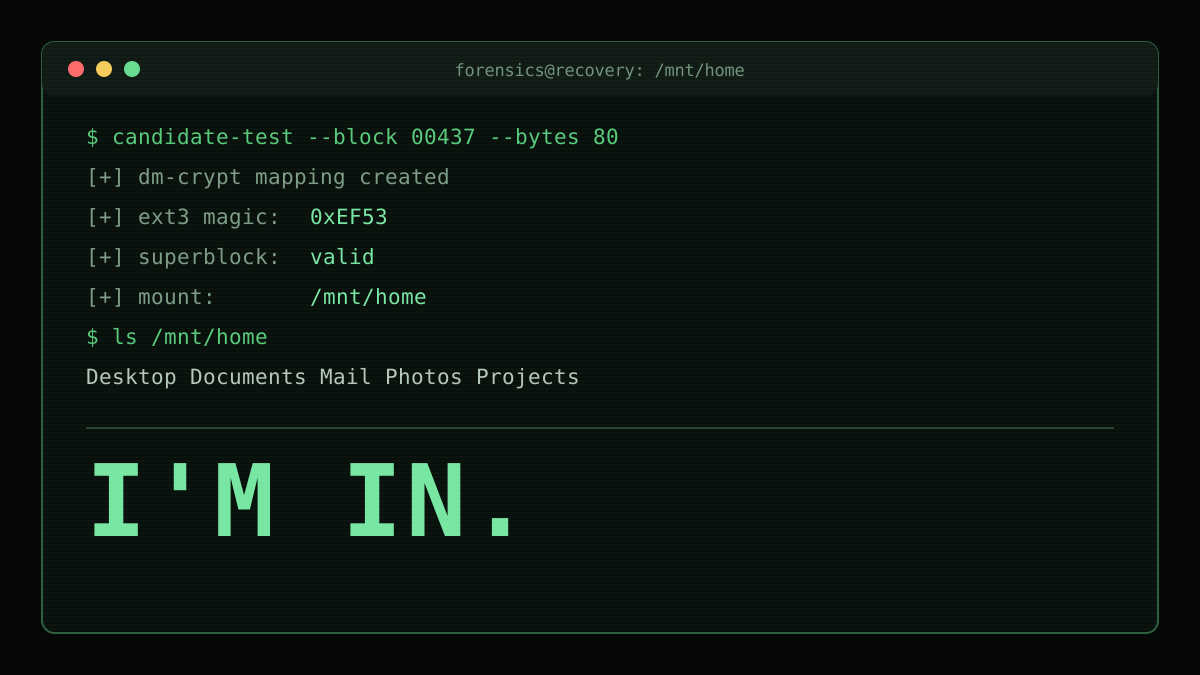
The AI walked through the data blocks in the neighbourhood of where the keyfile had lived and treated the first 80 bytes as a possible key. It then tested each candidate against the encrypted partition.
The test was:
- Take the candidate key.
- Use them as the raw key for a plain dm-crypt decryption with a plausible cipher and key size.
- Decrypt a small window of sectors at the start of the encrypted partition.
- Look at the result. Does it look like a real ext3 superblock? Does it have the right magic number? Do the block counts and inode counts look sensible?
This is basically the same idea I had all those years ago. Walk the disk. Try candidates. See what comes out. But two things made the AI's version dramatically better.
It knew what it was looking for. I didn't know the keyfile had to be exactly 80 bytes. The AI tool did and only ever tested 80-byte candidates from ext block boundaries. This was an absolutely enormous reduction in the search space.
Secondly, it validated much more cheaply. My tool relied on Linux's own mounting behaviour to check, which is why I spent months chasing false positives. The AI decrypted only the first few sectors and looked directly at the ext3 superblock. The magic number. The inode count. The block count. The block size. If those weren't sane, the candidate was thrown away in milliseconds and it moved on.
Most candidates produced obvious noise but one didn't!
At which point I had my home directory back.
What it cost and how long it took
It's worth being honest about this because any 'AI did a thing' article almost never quotes a price.
Unlocking the drive and writing up the process end-to-end came to about 13,000 AI credits. In GitHub Copilot's current pricing, 1 credit is roughly $0.01 USD. So about $130 all-in.
For comparison:
- I ran my own home-grown recovery tool for months on a computer that sat drawing power the whole time. I never added that electricity bill up, but it definitely was not zero.
- The commercial recovery tools I tried were not free and still failed to find the key.
- A specialist forensic recovery service, which I considered, would have been in a very different order of magnitude. Hundreds to thousands, easily. Without any guarantee of success.
As for how long, running on full YOLO autopilot mode it took about 45 minutes.
Takeaways
A few things I'll take out of this, in case any of them are useful to you.
Encryption really does its job. Nothing here weakens dm-crypt or AES. The data came back because the key had once existed in the clear, on an unencrypted part of the disk. That's a threat-model reminder, not a crypto one. A strong encryption setup can still be undermined by how you store and manage the key around it.
Delete is not erase. "Deleting" a file on a normal filesystem just unlinks it. The bytes stay put until something happens to reuse that space. If you actually want a file gone, you need to overwrite it.
Backups are worthless if you don't test them. My "backup" of the keyfile was the wrong file. I didn't discover that until I needed the backup. If I'd tested it once, at the time, I'd have noticed within minutes.
AI is really good at the "read everything and be patient" problem. The recovery didn't need any cryptographic magic. It needed someone, or something, willing to read a lot of old documentation. Understand a fairly obscure Linux configuration. Write small pieces of code to test hypotheses. And calmly try candidate after candidate. That's a really good fit for a coding AI agent.
Old data is a time capsule. Some of what came back is genuinely useful. Some of it is embarrassing. Some of it is a very sharp reminder of who I was in my twenties and what my desktop wallpaper priorities used to be. All of it is mine again, which is what I actually wanted.